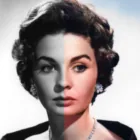
Colorize Images uses AI to add color to old black-and-white, grayscale, sepia, and faded photos. Choose an image to colorize, then save it or share it.
Details for this app
Colorize Images uses AI to colorize black-and-white photos, including grayscale, sepia, and faded images. It can process portraits, landscapes, family photos, and historical images; the generated colors are the AI’s reconstruction and may not match historical reality.
Choose a photo from your gallery or camera, or share one from supported apps such as Facebook, Chrome, WhatsApp, or Google Photos. The app supports JPEG and PNG files, and you can save a result to your gallery or share it on social media.
Colorization runs on GPU servers. Uploaded photos are stored on the service’s servers for up to 24 hours before deletion, and the listing says transfers are encrypted.
AI colorization for black-and-white, grayscale, sepia, and faded photos
Import photos from the gallery or camera, or share them from supported apps
Supports JPEG and PNG images
Save colorized images to the gallery or share them on social media
Colorization runs on GPU servers
Follow these steps to install the app on your Android device.
8 images
 Picsart AI Photo Editor, Video
 Video Editor & Maker - InShot
 Meitu
 Facelab - Selfie Face Editor
 VSCO: Photo Editor
 Gallery Vault