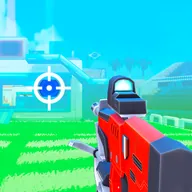
FRAG is a PvP hero shooter featuring 1v1 battles and 2v2 team matches. Build your lineup of heroes, switch between FPS and TPS views, and choose weapons and strategies to suit each battle.
Details for this game
FRAG is a PvP shooter from Oh BiBi that combines hero-based combat with flexible team and weapon choices. Create a lineup of heroes, enter different battles, and adapt your approach depending on the map and opponents. The game supports both first-person (FPS) and third-person (TPS) perspectives. In 1v1 matches, players can switch between five characters during combat, giving each team multiple heroes and weapons to use throughout the battle. FRAG also features a 2v2 online team mode, allowing players to cooperate with a friend or another player against an opposing team. With more than 150 heroes and 150 unique weapons available, players can build teams around different strengths, strategies, and roles. Hero customization includes skins and power adjustments. Players can also choose different approaches for their team, such as focusing on attack or defense, and adapt their weapon choices to the map and their preferred playstyle. Offline gameplay is also supported, allowing players to use the heroes and their abilities without an online match. Game Information:
App Name: FRAG
Developer: Oh BiBi
Package Name: com.ohbibi.fps
Version: 5.5.0
Version Code: 16780
Minimum Android: Android 7.0 (SDK 24) Category: 7352f1d3-ceed-42d9-83fe-a968714ea1cb FRAG includes adjustable controls and auto fire options. Missions provide additional rewards, while regular hero buffs and nerfs introduce changes to the game's evolving meta.
MENU MOD
One Hit Kill
God Mode
Unlimited Ammo
Unlimited Ability
Unlimited Diamonds
Unlimited Coins
Unlimited Joker Cards
Game Speed
Follow these steps to install the app on your Android device.
7 images
 Stumble Guys
 Grand Theft Auto: GTA San Andreas
 Grand Theft Auto V
 Saints Row: The Third
 Shadow Hunter Offline Games
 Shadow Fight 2