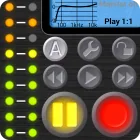
Field Recorder captures HD audio for music, meetings, voice notes, ambience, and more. It supports built-in or external microphones and USB sound cards, with adjustable recording settings and presets.
Details for this app
Field Recorder turns your phone into a portable audio recorder for music, meetings, interviews, lectures, voice notes, ambience, animal sounds, and other recordings. It works with built-in and external microphones or USB sound cards, and offers adjustable audio parameters with presets for tasks such as dictation, concerts, and phone calls.
Recordings can be made as WAV files, from mono 16 kHz/16-bit up to stereo 192 kHz/24-bit. The app can record, overwrite, resume, play, and share WAV files; helper apps can convert recordings to MP3, AAC, or FLAC. Recording tools include equalizers, low-cut filters, stereo balance correction, an amplifier, and a configurable limiter.
Other options include automatic recording start, stop, or resume controlled by volume, adding up to 90 seconds before and four seconds after a recording, and sending an email when a selected noise level is exceeded. During recording, the app can display a spectrum, signal, or sonogram, and its WAV player includes looping and adjustable playback controls.
Records WAV audio using built-in or external microphones and USB sound cards, with formats from mono 16 kHz/16-bit to stereo 192 kHz/24-bit.
Adjustable audio parameters include low-cut filters, equalizers, stereo balance correction, an amplifier, and a configurable limiter.
Provides predefined recording presets and lets users save their own settings as presets.
Can automatically start, stop, or resume recording based on volume, and add up to 90 seconds before and four seconds after a recording.
Includes recording displays for spectrum, signal, or sonogram, plus a WAV player with loop playback.
Follow these steps to install the app on your Android device.
8 images
 Spotify: Music and Podcasts
 Deezer
 Music Speed Changer
 Oto Music
 YT Music Morphe
 Poweramp Music Player